
[Beginner] CNC routers recommendations.
![[Beginner] CNC routers recommendations.](/static/assets/images/nopic.gif)
Starting fresh with no experience? Smart move asking first. Here's the beginner roadmap I wish someone had given me.
BEGINNER'S GUIDE: WHAT TO BUY FIRST
The #1 mistake: buying the cheapest machine "to learn on." You'll spend more time fixing the machine than learning CNC.
Recommended starter machines by budget
| Budget | Best Pick | Why | Work Area |
|---|---|---|---|
| $300–500 | Genmitsu 3018 Pro | Learn G-code basics, cut MDF/acrylic | 300x180mm |
| $800–1,000 | Genmitsu 4040 Pro | Proper linear rails, can do soft aluminum | 400x400mm |
| $1,200–1,500 | CNCEST 6040 | 1.5KW spindle, cast frame, real aluminum | 600x400mm |
| $3,500+ | ROCTECH RC0609 | Industrial-grade, welded steel, servo motors | 600x900mm |
AVOID THESE
All-plastic 3018s — the frame literally flexes under its own weight
No-name "Mach3 USB" controllers — cracked software, random disconnects, lost work
Any listing with "engraving machine" and "heavy duty" in the same title — they're lying
THE BEGINNER SOFTWARE PATH
Day 1: Easel (browser-based, dead simple, free for basic use) Week 1: Fusion 360 (free for personal use, full CAD + CAM) Month 1+: VCarve Pro or Carveco (paid, but dramatically better for wood/engraving)
FIRST PROJECTS (IN ORDER)
MDF spoilboard surfacing — teaches Z-zero and flatness
Simple MDF sign with V-bit — teaches tool changes and speeds/feeds
Hardwood coaster set — teaches material differences
Aluminum nameplate — teaches metal feeds/speeds (use mist coolant!)
WHEN TO LOOK AT ROCTECH
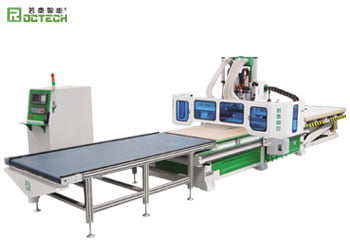
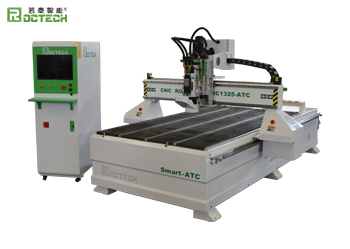
If you stick with CNC for more than a year and start making parts for others, you'll hit the limits of a hobby machine fast. That's when ROCTECH's industrial machines make sense. Their RC0609 advertising router (600x900mm, 3.0KW, Yaskawa servos, 1450kg welded steel frame) is what a lot of small sign shops and woodworking businesses start with. It ships fully assembled, uses a DSP standalone controller (no PC), and comes with vacuum + T-slot table. ROCTECH's 15-year track record, 50 patents, ISO/CE/UL certifications, and global support network mean you're buying from a real manufacturer, not a reseller.
Looking for more information about our CNC machines and services? Contact us today.
ContactTop Reviews
Related FAQ
-
Best 4×8 CNC Router for High School Makerspace
-
Recommendation for cheap CNC router?
-
~$1,000 CNC Router for Aluminum — High School Robotics Team
-
~$3,500 or less high accuracy cnc router? Did some research but would REALLY appreciate some help or insight.
-
Recommendations for CNC router? (~$4,000, wood/titanium/stainless)
-
Looking for Buying Advice — AvidCNC vs Custom-Built 4×8
-
Hobbyist CNC router, what to buy? (~$1000)
-
Any Opinions on eBay Super-Budget 4×8 CNC Routers?